Step 2.1 · Day 2: CSS design · Review + new
How CSS works
CSS (Cascading Style Sheets) controls how the HTML looks: color, type, spacing and layout at every screen size.
The parts of a CSS rule
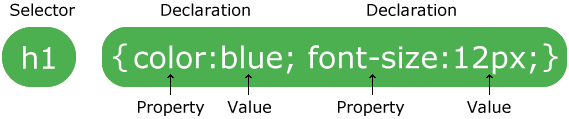
- The selector chooses which HTML to style.
- Each declaration is a property and a value, separated by a colon and ending with a semicolon.
- Declarations sit inside curly braces
{ }. A missing}breaks every rule after it.
Selectors you will use
| Selector | Styles |
|---|---|
body | the element itself: here, the whole page |
.card | every element with class="card" (a period means “class”) |
nav a | every link inside the nav (a space means “inside”) |
nav a:hover | a nav link while the mouse is over it |
h1, h2, h3 | all three heading levels (a comma means “and”) |
The cascade
When two rules style the same thing, the browser decides which one wins:
- The more specific rule wins.
.card h3beatsh3. - If they are equally specific, the later rule wins. This is why responsive rules go at the bottom of the file.
Units
| Unit | Means | Use for |
|---|---|---|
px | pixels | borders, shadows, small fixed details |
rem | multiples of the base font size (1rem = 16px) | font sizes and spacing, because they grow if a visitor enlarges their text |
% | a share of the parent element’s width | flexible widths |
fr | a fraction of the free space in a grid | grid columns |
Look it up
Keep the W3Schools CSS reference open while you build.
© Created by Sara Rosenstock, Marietta College Graphic Design.