Step 3.1 · Style sheet (CSS) · Review
CSS explained
CSS (Cascading Style Sheets) controls how the HTML looks: colors, fonts, spacing and layout at every screen size.
CSS syntax
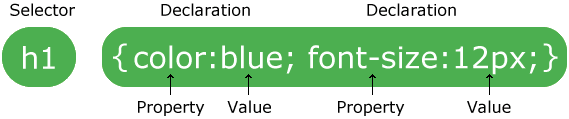
- The selector chooses which HTML to style.
- Each declaration is a property and a value separated by a colon, ending with a semicolon.
- Declarations sit inside curly braces
{ }.
Selectors you will use
| Selector | Styles |
|---|---|
p | every paragraph |
.topic-card | every element with class="topic-card" |
nav a | every link inside the nav (a space means “inside”) |
nav a:hover | a nav link while the mouse is over it |
nav a:focus-visible | a nav link reached with the Tab key |
h1, h2, h3 | all three heading levels (a comma means “and”) |
CSS Selectors: A Visual Guide shows every selector with diagrams.
The cascade
When two rules style the same thing, the browser decides which one wins:
- More specific wins.
.topic-card h2beatsh2. - If equally specific, the later rule wins. This is why media queries go at the bottom of the file.
The box model
Every element is a box with four layers, from the inside out: content, padding (space inside the border), border and margin (space outside). Open DevTools (step 5.2) and hover any element to see its boxes.
Units for flexible layouts
| Unit | Means | Use for |
|---|---|---|
px | pixels | borders, small fixed details |
rem | multiples of the base font size (1rem = 16px) | font sizes |
% | a share of the parent's width | flexible widths |
fr | a fraction of the free space in a grid | grid columns |
ch | the width of a “0” character | line length (max-width: 65ch) |
vw, vh | 1% of the screen's width or height | full-screen elements |
Responsive design and media queries
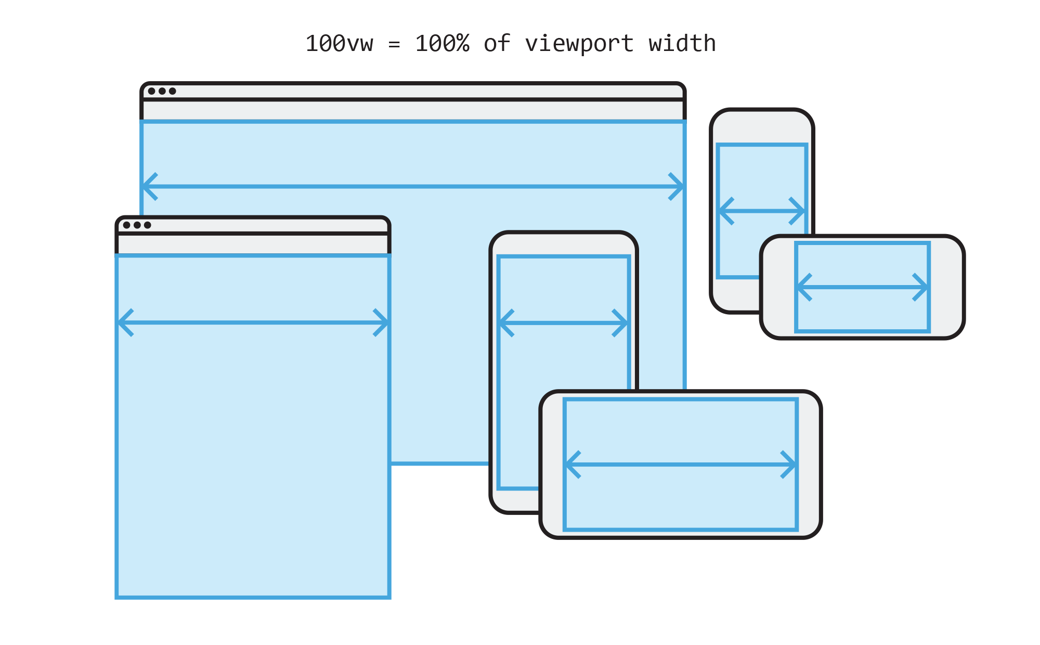
A media query applies CSS only when the screen matches a condition, such as a minimum width:
/* Applies on every screen */
.gallery { grid-template-columns: repeat(2, 1fr); }

/* Applies only when the screen is 600px wide or wider */
@media (min-width: 600px) {
  .gallery { grid-template-columns: repeat(3, 1fr); }
}
This project is mobile-first and fluid: you write the phone layout first with flexible grids that stretch to any width, then add a few media queries for changes at tablet and desktop sizes. Step 3.5 shows how.
Work through the CSS lessons in Web Design Playground, and keep the W3Schools CSS reference open while you build.
© Created by Sara Rosenstock, Marietta College Graphic Design.