Imagine you’re building a house. HTML is like the structure—the walls, roof, and windows. But without paint, furniture, or decorations, it looks plain. CSS (Cascading Style Sheets) is like the design and decoration—it controls how your website looks, including colors, fonts, layout, and animations.
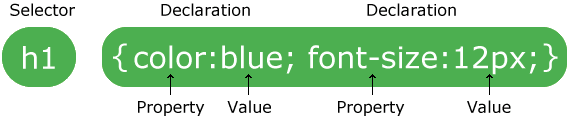
- The selector points to the HTML element you want to style.
- The declaration block contains one or more declarations separated by semicolons.
- Each declaration includes a CSS property name and a value, separated by a colon.
- Multiple CSS declarations are separated with semicolons, and declaration blocks are surrounded by curly braces.
- #header signifies an ID Selector and can be named anything, but can only be used once per HTML page. Since it can be named anything it doesn’t always imply the meaning of the element (HTML 4).
- Example: #stage
- Selectors without the # before it, such as “header” are HTML5 elements and can be used more than once in a single HTML page.
- Example: h1
- Selectors with a . (period) before it, are classes and can be used more than once in a single HTML page.
- Example: .emphasis
CSS Syntax
Div tags (#) and Selectors
CSS Reference Selectors (Full List)CSS Declarations...EXPLAINED
We included Classes to the CSS you just wrote. Classes can be applied to many objects in an HTML document, while ID tags that are used for div(s) can only be applied to one (1) ID per HTML page.
CSS Reference Properties (Full List)For example
img {max-width: 280px; max-height: 280px;}
This style applies to all images (img) in that HTML page.
#footer img {width: 60px; height: 60px;}
This style applies to all images (img) within the #footer ID in that HTML page.
p {font-family: Times, “Times New Roman”, serif; font-size: 1em; line-height: 1.2em; color: #000000;}
This style applies to all text in a paragraph (p) unless a different CSS Selector specifies different declarations in that HTML page.
a This style applies to all links (a) unless a different CSS Selector specifies different declarations in that HTML page.
a:hover This style applies to all links (a:hover) when they are hovered over unless a different CSS Selector specifies different declarations in that HTML page.
ul This style applies to all unordered lists (ul) unless a different CSS Selector specifies different declarations in that HTML page.
li This style applies to all list items (li) unless a different CSS Selector specifies different declarations in that HTML page.
nav li a:hover {background-color:#373232;}
This style applies to all list items, that are links in the #nav ID when you hover over them.
.nav_color1 {background-color: #ED1515;}
This style can be applied to one navigation link to make the background a unique color.
.nav_color3 {background-color: #FCCD08; color:black;}
This style can be applied to another navigation link to make the background a unique color and the text color “black”.
@media screen
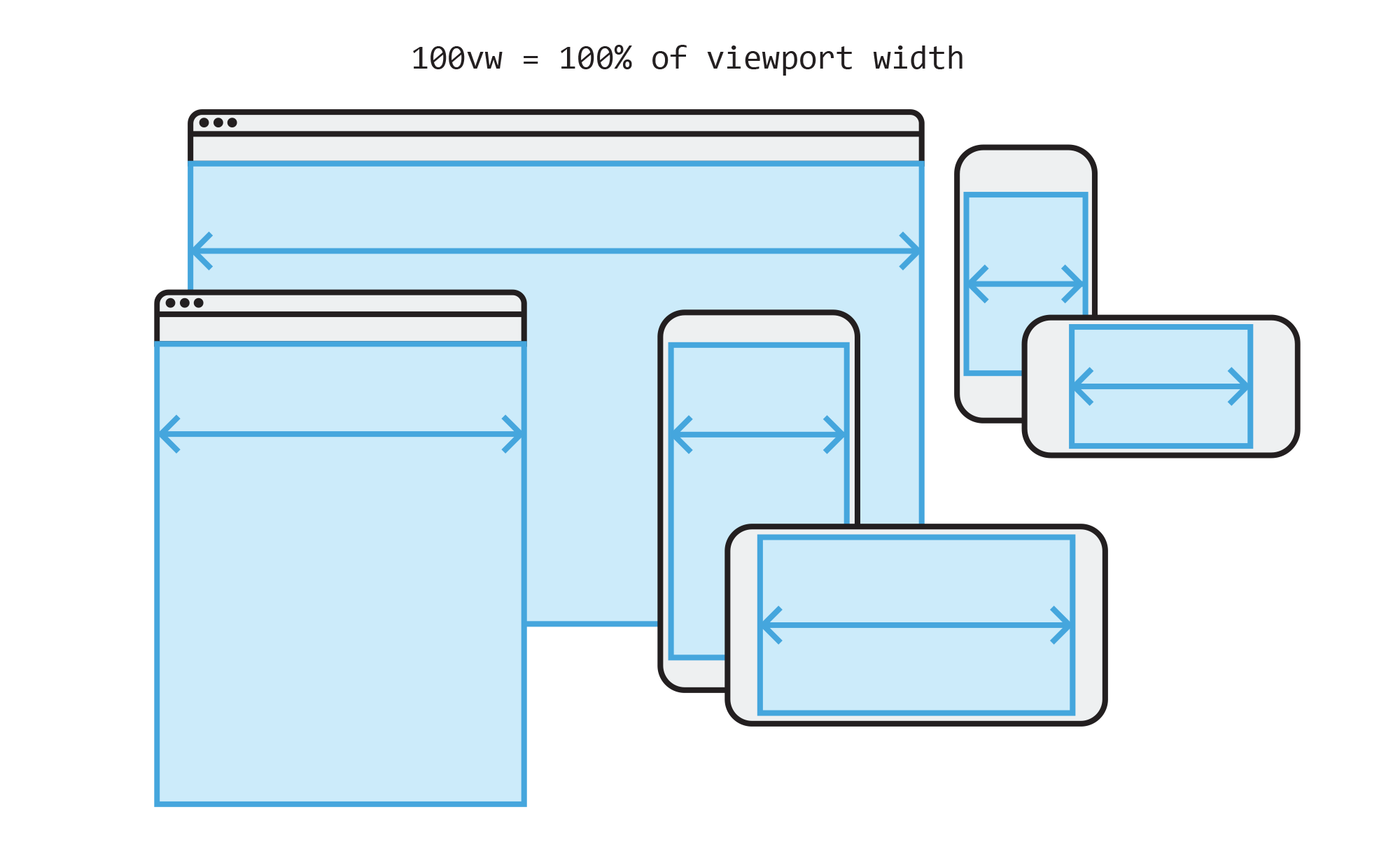
The viewport is the user's visible area of a web page.
What is @media screen in CSS?
Think of @media screen as a way to tell your website how to look on different screen sizes—like making sure your website works well on phones, tablets, and computers.
Why is @media screen useful?
Websites can look too big or too small on different devices. With @media screen, you can change styles to make sure everything fits perfectly on different screens.