Once you have completed your research you are ready to design. You will need the following content BEFORE you proceed:
- Introductory paragraph that explains the theme.
- Paragraph descriptions for each section within the theme.
- Four (4) Paragraph total.
- 9–12 photographs/images for EACH Section
- Remember to save the links (URLS) to cite the sources.
- Choose 1–2 fonts from Google fonts to utlize in your design. Google Fonts
Written Content:
Photographs
Font Choice
- Open the "Design Template Files" that are supplied to you.
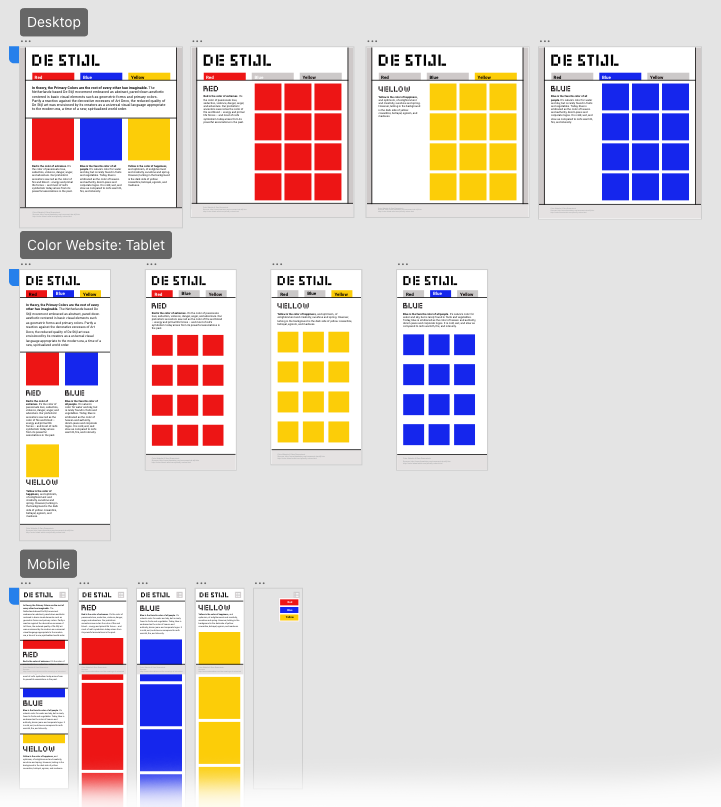
- ColorWebsite_DesignTemplate.fig: This template file was created for you to use for designing your Color Website. It is available in the "Class Resources" file in Figma.
- Students need to adapt the design for different screen sizes
- Desktop: Screen is larger than 1000 pixels wide
- Tablet: Screen is 680 pixels to 1000 pixels wide
- Mobile: Screen is smaller than 680 pixels wide
- Complete Design in Figma (for all screen sizes). The designs must adhere to the structure and size restrictions provided in the template and wireframes.
- Home page (Desktop, Tablet & Mobile)—3 artboards/pages
- Galley Page #1 (Desktop, Tablet & Mobile)—3 artboards/pages
- Galley Page #2 (Desktop, Tablet & Mobile)—3 artboards/pages
- Galley Page #3 (Desktop, Tablet & Mobile)—3 artboards/pages
12 artboards/pages total
- The next step is to export image files. You will only export graphics from your Figma file that are NOT photographs (for galleries). The type of elements that you will need to export digital files for are:
- Header graphic
- Background Graphic
- Photographs will be formatted in Photoshop (see "Image Prep" page)
- Fonts will be specifified using CSS (See "Fonts" page)
Design Website for all devices (desktop, table & mobile)